LANGUAGE & CONTROL · ENGLISH EDITION
Translate a live room: check page text, chat and audio separately
Check what browser translation covers in a live room. Test page controls, new chat messages and audio, then clarify prices and boundaries before acting.
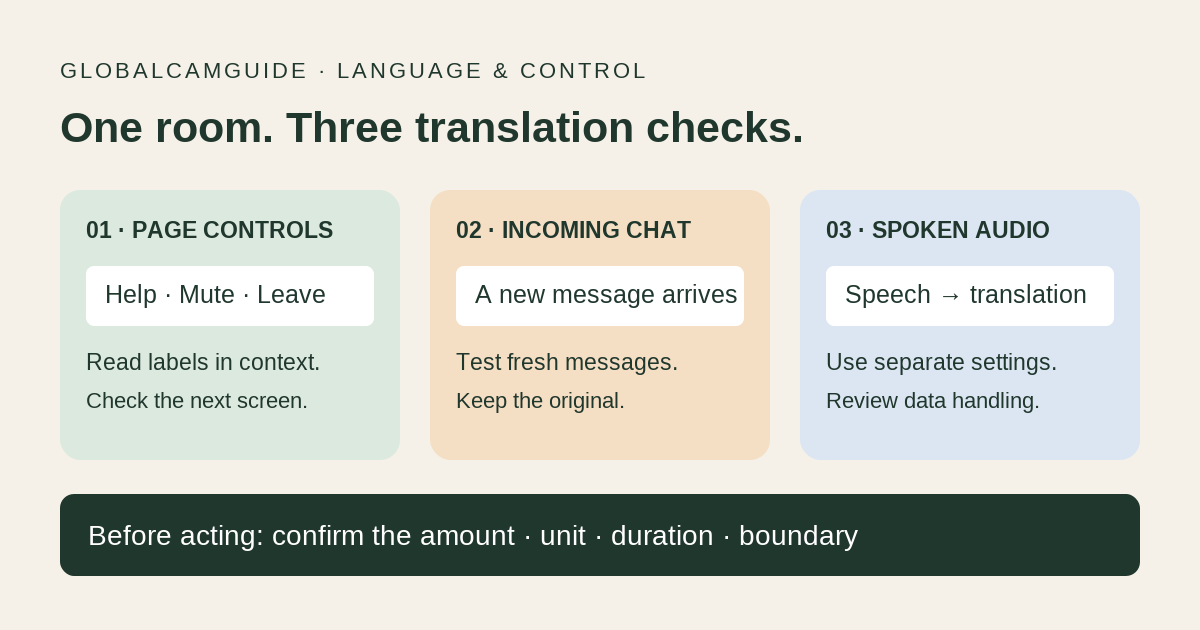
To translate a live room, check three things separately: the page controls, incoming chat messages and spoken audio. A translated menu does not demonstrate that new messages or speech are being translated. Test each surface before relying on it, and confirm any price, duration or boundary in plain language.
Translation tools make international browsing easier, but their names can blur different jobs. Google's 4 September 2026 Translate announcement described Android background audio translation and iOS earpiece playback. That is a useful example of audio translation evolving separately from page translation. It does not establish that a particular live platform has added either feature.
This November guide addresses a current practical question for multilingual visitors, rather than claiming a new platform rollout or a measured rise in demand. The checklist below is our editorial method for testing what you actually understand before interacting.
Start with the site's own language edition
Look for a language menu before using a separate translator. Check whether it changes just the navigation or also the help, purchase screen and room rules. A flag or language label is a starting point for inspection, not proof that every part of the service uses that language. Keep the original text available when you need to clarify something.
On GlobalCamGuide, the language directory leads to 50 existing guide editions. They disclose their machine-translated draft status. Those editions translate our guide, not the external platforms linked from it. Selecting an edition here does not change the language of another site's checkout or of a creator's messages.
Use page translation to read controls
For Chrome on a computer, Google's page translation instructions describe the Translate control beside the address bar and a right-click option. They also describe translating selected text. Try a small, non-sensitive paragraph first and check the chosen source and target languages. Menu names can vary with your device and browser language.
Then inspect the controls you may need: leave, mute, help and purchase confirmation. Compare a translated label with its surrounding explanation. If two buttons become similar after translation, do not guess which commits a payment or begins a session. Find the original label or the service's own help before proceeding.
If a translated control still does not work on your phone, separate the language problem from browser support. CamEval's mobile browser compatibility checklist walks through permissions, playback and the destination's own requirements. We also publish CamEval; its checklist does not establish that a particular room or translator will work on your device.
Test the actual destination too. A readable room page does not tell you whether an account dialog, a new tab or the final purchase screen is readable. Our 25-tip guide provides broader advice on room controls, spending and boundaries; translation should support those checks rather than replace them.
Check new chat messages after the page loads
A room's text is not one fixed document. Messages may arrive after your first translation attempt. Our practical test is to wait for a harmless new message and see whether it appears in the target language. Compare it with the original where available. Repeat after switching rooms or reopening the chat panel. Do not infer ongoing translation from a translated welcome message.
For your own messages, write one short idea at a time. Avoid slang, double negatives and several requests joined together. A neutral clarification might be: “I use translation. Does 20 mean tokens per minute, or a total of 20 tokens?” That example is a question format, not a real room quote. Separate the quantity, unit and duration so the other person can correct a specific misunderstanding.
If a reply remains unclear, pause. A second translation or a translation back into your first language can suggest a question to ask, but should not be treated as independent proof. Both versions may preserve the same mistaken assumption. Ask the person or the service's support to resolve the original meaning.
Treat captions and translated audio as separate settings
Captions represent speech as text; translation changes the language. Google's Chrome captions documentation separates Live Caption from Live Translate. It says Live Caption processes audio and captions locally, while Live Translate sends captions to Google for translation. Read the instructions for your device and consider that distinction before enabling translation for a private conversation.
Test with ordinary, non-sensitive media first. Check that you have selected the language being spoken and the language you want to read. Then ask whether the result is useful to you: can you follow the speaker without losing the chat or the leave control? A tool that produces words is not necessarily a setup that you can use comfortably in a fast conversation.
Prefer a slower exchange or a shared written language when the meaning matters more than speed. Avoid sending another person's private conversation to a separate translation service without their agreement. You can ask for a short clarification without uploading a screenshot of a whole room or exposing usernames and account details.
Confirm numbers and boundaries explicitly
Keep a small confirmation note for any decision you are considering: what action, which unit, how much, and for how long? For a schedule, include the date and named time zone; our live-room time-zone guide explains why a local clock time alone is incomplete. For a paid action, read the current confirmation screen in addition to the chat. If you are budgeting for a timed session, use the token and session cost calculator with the checkout total and room rate you can verify.
Use equally direct language for preferences and limits. If a response is ambiguous, ask again or leave. Translation does not oblige you to continue, and a friendly exchange does not replace a clear agreement. Keep access to the original text and the exit control throughout.
A quick check before joining in
- Choose a language you can read and locate the original text.
- Identify the help, mute, leave and purchase controls.
- Test a newly arriving message rather than only a static label.
- If using audio translation, review its device support and data handling.
- Clarify any amount, unit, duration or boundary before acting.
The goal is a conversation you can understand well enough to make your own choices. When the translation leaves an important detail uncertain, a short pause and a specific question are more useful than a fluent-looking guess.
A reproducible translation record
Use non-sensitive text and keep the original visible. Record your browser name and version, operating system, source and target languages, and check time. Try the same three tasks after a room change. The table below is a completed scope record, not a claim that we translated a live conversation.
| Layer | Repeatable task | What the evidence establishes |
|---|---|---|
| Static page text | Translate a harmless paragraph; switch back to the original and compare a named button. | Chrome documents page and selected-text controls. A particular platform’s translated checkout was not tested. |
| New chat text | Wait for one harmless new sentence after translation, then change rooms and repeat. | Whether that new sentence changed language in that browser session. No continuing chat translation is confirmed by this guide. |
| Spoken audio | Use a separate supported audio translator on a non-sensitive spoken sentence; check mute and exit. | Audio needs its own verified tool and conditions. Page translation alone is no proof of translated speech. |
Mozilla’s Firefox translation documentation explicitly distinguishes text translation from images and video. Neither browser reference verifies an external room’s chat implementation. If a test is blocked, write “not tested” and the barrier instead of interpreting a translated menu as a successful audio or chat test.
German readers can use the revised German language-check tip and schedule example. These are localized guide sections; this article remains English. Translation drafts remain disclosed, and we do not claim a human native-language review or fifty translated blog articles.