LANGUAGE & DISCOVERY · ENGLISH EDITION
Live-room language filters: what the labels actually tell you
Separate site language, room language labels and country filters. A practical checklist for finding a conversation you understand without guessing nationality.
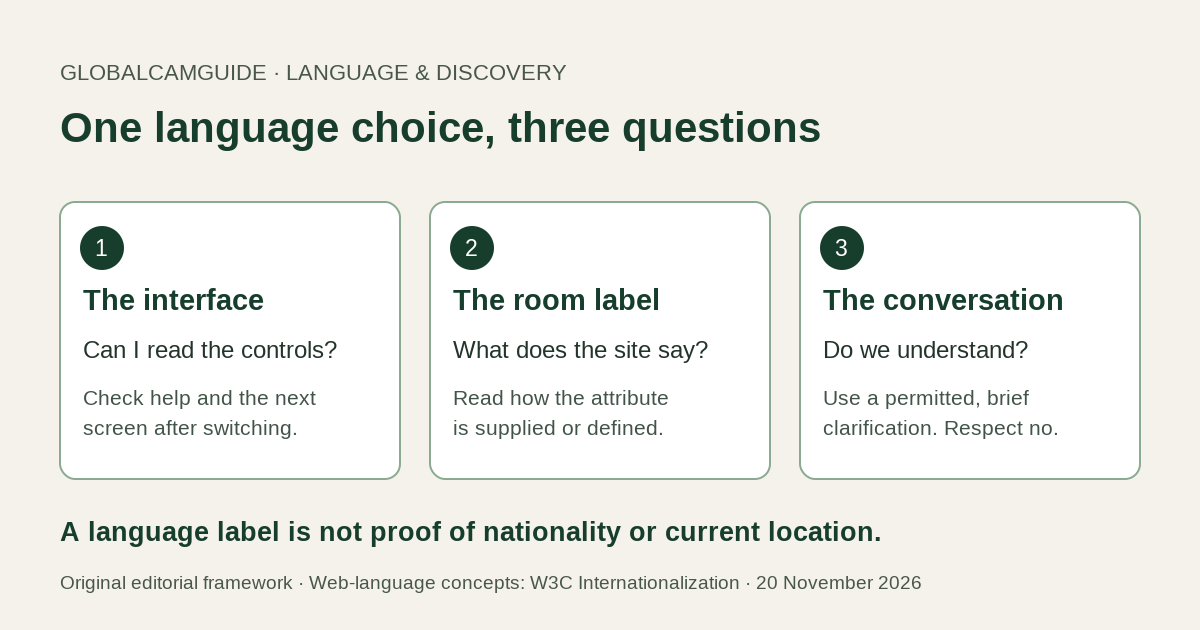
A live-room language filter helps narrow a list; it does not prove a person's nationality, current location or fluency. Check three independent things: the language of the website's controls, the language reported for a room, and the language you can actually use together.
For November browsing and travel, it is useful to settle those distinctions before changing several settings at once. This is a practical guide, not a claim that a platform has launched new filters or that demand has increased. Our sources explain web-language behavior; the room-checking method below is our editorial interpretation, not a provider test.
Start with the question you need answered
“Show me Spanish” can mean several things. You might want navigation in Spanish, a creator who lists Spanish, help in Spanish, or a conversation you can comfortably follow. Write down the actual task first. A room search cannot necessarily solve an unreadable purchase screen, and a translated menu does not establish who speaks in a room.
On GlobalCamGuide, the language directory changes the edition of our own guide. Its existing editions disclose their machine-translated draft status. It does not change the account settings, creator information or checkout of an external service. Keep the service's own language controls separate from our editorial navigation.
Website language is one setting
Your browser can send a preference for the language of pages. W3C's browser language-preference guide explains that a server may use that preference when it has suitable editions, while some services use other signals. A preference does not force every site to translate itself. Nor is it a promise about the language of live conversation.
Try the site's visible language menu first. Then inspect help and the next ordinary screen, without committing a payment. If the main navigation changes but help remains unreadable, record that specific limit. Changing your phone's entire system language is a much broader step than selecting a page edition, so begin with the smallest control that addresses your task.
Room language is a separate label
A provider may offer language filters or display languages in a profile. Read the nearby explanation, if any, to learn whether a label is creator supplied, inferred or editorially assigned. If the page does not explain its method, keep the label's origin unknown. Avoid turning an unexplained filter result into a claim of verified fluency.
Start with one language and note any other active filters. If nothing appears, reset unrelated choices such as category or status before deciding that the language is unavailable. An empty intersection describes that result set at that moment. It does not establish that nobody on the service uses the language, or that a person is offline everywhere.
Do not infer a sensitive personal history from the label. A language can be learned, used at work or shared across many places. A flag, accent or room description is not a reason to investigate a person's address or identity. Choose based on communication you need, while respecting the information they elect to share.
Country and region codes need context
W3C's language-tag explanation shows how a language tag may include a regional variety: for example, fr-CA describes French as used in Canada, and es-419 describes Spanish as used in Latin America. Those are descriptions of language usage, not identity documents.
Our reading rule is therefore simple: treat a country selector as its own setting and read what that site says it means. It may describe an audience, edition or provider-reported attribute. Do not assume all selectors follow the same standard. A regional language variant cannot independently establish a creator's nationality or where they are connecting from today.
Check communication without creating pressure
When a room permits ordinary text questions, ask something brief and non-sensitive, such as “Is English okay for a short question?” Respect the room's rules and the person's choice not to answer. You can read a profile first or leave quietly; a language label creates no obligation for anyone to hold a conversation.
If using a translator, explain that when useful and keep each sentence to one idea. Clarify an amount, unit and duration separately before any paid action. Our page, chat and audio translation checklist explains why successfully translating navigation does not establish ongoing chat or speech translation.
A small comparison record
| Your task | What to check | Keep separate |
|---|---|---|
| Read the interface | Open help after choosing a site edition | The creator's spoken language |
| Find a room label | Select one language and inspect its explanation | Fluency, nationality and location |
| Understand a conversation | Ask a permitted short clarification | A guarantee about future exchanges |
Record only the details needed for your decision: the selected filter, what the page explained, and what remains unclear. Avoid collecting usernames or private conversations into a comparison spreadsheet. If your next action depends on understanding a control or condition, resolve that point through the service's official help before continuing.
For a scheduled visit, language is only one part of the plan. Use the date and named-time-zone checklist rather than guessing a schedule from a flag. The most useful result is a route you can understand and leave comfortably, with any uncertain attributes left uncertain.
If you are choosing a platform, use the language and mobile checks for comparing platforms before buying credits or tokens.